


Optimize your X (Twitter) header photo with these dimensions: 1500 pixels wide by 500 pixels tall. You’ll also need to account for your profile picture in the bottom left corner.
If you’ve ever struggled with X (Twitter) header dimensions you’re not alone…
Even though X has provided guidelines for their header photo size, it’s still ridiculously difficult to get the sizing just right. That’s because X covers the bottom left portion of your header image with your profile picture, and they may slightly crop the top and bottom of your header photo depending on the device, screen size, and browser.
The good news is we’ve solved this problem and are here to help you do the same.
In this article, we’ll cover in detail what X (Twitter) header size you should be using along with some guidelines to ensure that it displays properly.
X’s guidelines for header photos
Before we dive into some optimization tactics, let’s go over X’s recommended guidelines for header images.
- Header photo recommended dimensions are 1500px by 500px, which has an aspect ratio of 3:1
- Photos can be in any of the following formats: JPG, GIF, or PNG. (X does not support animated GIFs for profile or header images.)
- X recommends that profile photos and banner image file sizes should be under 2MB
Here’s the problem…
Even if you follow these guidelines, your header image may not look right after you’ve uploaded it. That’s because you need to account for your profile picture in the bottom left corner of your header photo.
In reality, the recommended X header dimensions actually look like this:
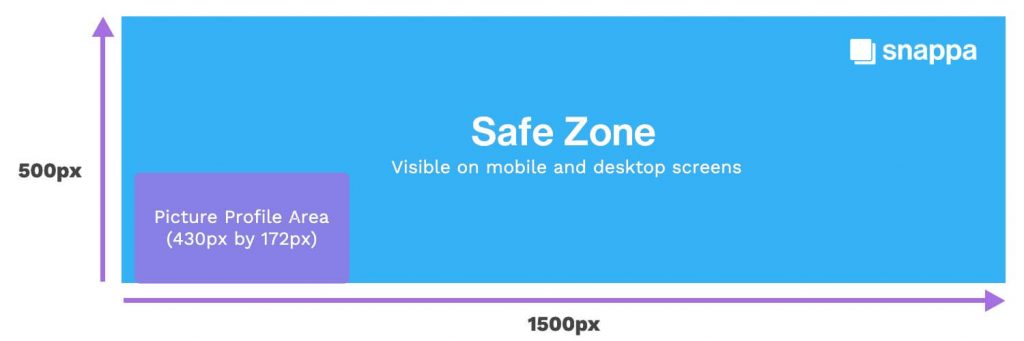
Let’s cover the profile picture area in a bit more detail.
Accounting for your profile picture
Ensuring your X profile picture doesn’t interfere with your header photo is actually more complicated than you think. That’s because the position of your profile picture in relation to your banner will change depending on the device and screen size.
For example, here’s a screenshot of an X header image on a desktop computer:

If you look at how the same X banner displays on a mobile device, you’ll notice that the profile picture sits lower and covers less of the header image:

The Best X (Twitter) Header Size

Here’s what we recommend for your X (Twitter) header dimensions:
- Use the recommended banner sizing of 1500px by 500px
- Leave space in the bottom left corner to account for your profile picture
- Leave some empty space at the top and bottom of your header photo

If you’re looking for a quick and easy way to make a sharp X (Twitter) header, check out our video tutorial:
How to Make an X (Twitter) Banner with Templates
We know just how frustrating it can be to get the sizing of your X (Twitter) header just right. That’s why we’ve built these safe zones directly into our X (Twitter) header maker.
You can choose from a variety of professional pre-made X (Twitter) header templates that match your needs.
When you create X header images, we display the profile picture area that you need to watch out for. You can even toggle this on and off.
Now you’ll never have to worry about X header sizing ever again!
Conclusion
As you can see, optimizing your X header isn’t as easy as you’d think. We hope this guide helps clear things up and allows you to perfectly size your X banner image without running into any issues.
